
Get the app
It counts your kills on the leaderboards, keeps the addon's saved data safe, and brings bounties from Discord into the game.
Windows
Download for Windows0.2.61 · 4.8 MB · Windows 10 or 11
Signed · 62 of 62 antivirus engines found nothing
File details
- File
WantedDeadOrDead-0.2.61.msi, 2026-10-23- SHA-256
0111bc28213fc4f872a757b6c8e6b51fcde4b53a4bd83642307fab3628cfa2b7- VirusTotal
- Checked October 23, 2026: 62 of 62 antivirus engines found nothing, including Microsoft, Google, Kaspersky, ESET, Bitdefender, CrowdStrike, SentinelOne, Sophos, Symantec, Trend Micro, McAfee, Trellix, Malwarebytes, Avast, AVG, Avira, Fortinet, Check Point, Panda, G Data. The report
Mac
Download for Mac0.2.61 · 14.3 MB · macOS 13 or later
Signed and notarized by Apple · 61 of 61 antivirus engines found nothing
File details
- File
WantedDeadOrDead-0.2.61.dmg, 2026-10-23, for Apple silicon or Intel- SHA-256
a1f12d4e6dcb9b459da8ee50a35e61cf73f1b811c3f94b9ebff2ea6933dd2e2f- VirusTotal
- Checked October 23, 2026: 61 of 61 antivirus engines found nothing, including Microsoft, Google, Kaspersky, ESET, Bitdefender, CrowdStrike, Sophos, Symantec, Trend Micro, McAfee, Trellix, Malwarebytes, Avast, AVG, Avira, Fortinet, Check Point, Panda, G Data. The report
What it does
Your kills count. It sends what the addon records, signed on your PC, so a kill you saw confirms someone else's and theirs confirms yours. Only confirmed kills rank.
- Your saved data comes back. If the game loses the addon's saved data, the app puts it back before you log in.
- Bounties from Discord reach the game. Post one from your server and your character is asked once, at the next login.
Setting it up
A couple of minutes, with the addon from CurseForge installed first.
-
Install
Open
WantedDeadOrDead-0.2.61.msifrom your Downloads. Windows sets it up in a few seconds, just for you (no administrator needed), and starts the app. After that, Wanted is in your Start menu.Its window opens in your web browser: that window is the app.
-
Find the icon
The app lives in the tray, by the clock at the bottom right. If you don't see it, click the ^ arrow. Click it to open the window; right-click it for Start with Windows (on by default) and Quit.
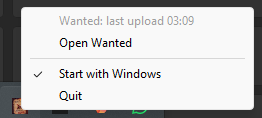
Right-click the seal by the clock. -
Sign in
Press Sign in on your WoW account's card. This website opens: sign in with Battle.net or Discord, then press Connect the app to my account. Several WoW accounts? Sign in on each card.
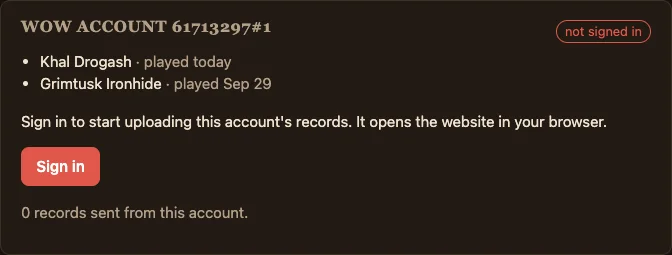
The app's window, before signing in. -
Link your characters
They link by themselves. The first time only, quit the game completely and start it again (a
/reloadisn't enough), then log in. A character still not linked? Press Get a link code, copy it, and paste it into WoW chat.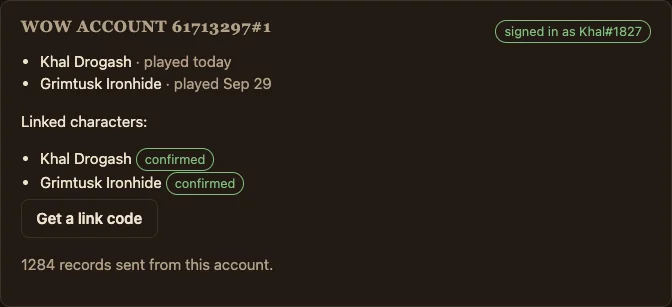
The app's window, signed in and linked.
-
Install
Open
WantedDeadOrDead-0.2.61.dmgfrom your Downloads and drag Wanted onto Applications. Then open it from Applications; the first time, your Mac asks whether to open an app from the internet: choose Open.Its window opens in your web browser: that window is the app.
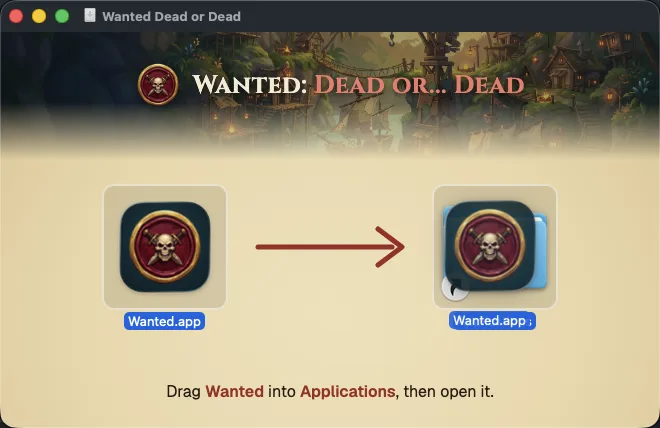
Drop Wanted on Applications. -
Find the icon
The app lives in the menu bar at the top of the screen, as a small seal with a W. Click it for Open Wanted, Start with my Mac (on by default) and Quit.
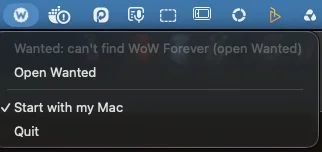
Click the seal in the menu bar. -
Sign in
Press Sign in on your WoW account's card. This website opens: sign in with Battle.net or Discord, then press Connect the app to my account. Several WoW accounts? Sign in on each card.
The app's window, before signing in. -
Link your characters
They link by themselves. The first time only, quit the game completely and start it again (a
/reloadisn't enough), then log in. A character still not linked? Press Get a link code, copy it, and paste it into WoW chat.The app's window, signed in and linked.
Questions
What does it upload, and what does it never touch?
It reads the Wanted addon's saved data and the game's combat log, and uploads the kills, deaths, assists and bounties in them, signed with a key that stays on your computer. It never reads other addons' data, and nothing of it runs inside the game. The privacy page lists everything.
How does it update?
By itself. It checks for a new version, downloads it, checks its signature, and installs it once World of Warcraft isn't running. An app installed with the older setup program moves itself to the new Windows installer once, keeping your sign-in and settings.
How do I remove it?
Windows: Settings, Apps, Installed apps, Wanted: Dead or... Dead, Uninstall. Mac: choose Quit in its menu bar menu, then drag Wanted from Applications to the Trash. The addon keeps working without it.